Develop a NOMAD plugin
In this tutorial series, you will develop a custom NOMAD plugin that extends NOMAD with a domain-specific schema package and a parser. To follow the full development workflow, we chose several possible applications as an example, including simplified optical microscopy measurements and black-body radiation calculations. The tutorial utilizes a set of exercises leading to the development of a working plugin that can be tested locally and integrated into a NOMAD Oasis deployment. The exercises cover everything from creating a plugin repository and defining schemas to implementing parsing and testing.
What you will learn
In this tutorial, you will learn how to:
- Create and version-control a NOMAD plugin repository using Git and GitHub
- Generate a plugin project using the official NOMAD cookiecutter template
- Set up a development and testing environment for the plugin
In the following tutorials, you will create a custom schema package and a parser.
Before you begin
This tutorial assumes basic familiarity with Python and Git, as well as minimal experience of using NOMAD. It is intended for users who want to extend local NOMAD deployment (NOMAD Oasis) with custom functionality.
Before starting this tutorial, make sure you have the following:
-
GitHub account Required to create and manage the plugin repository. You can create a free account at github.com/signup.
-
Basic understanding of Python You should be comfortable reading and writing basic Python code, including modules, functions, and classes.
-
Basic understanding of NOMAD metainfo Familiarity with NOMAD’s metainfo system is helpful. If needed, review FAIRmat Tutorial 8.
-
Local or cloud-based development environment You need either:
- A local machine with Python ≥ 3.12, git, and any Integrated Development Environment (IDE), or
- Access to GitHub Codespaces for cloud-based development.
Background concepts used in this tutorial (optional)
This tutorial touches on several common software-development tools and concepts. You do not need to master them in advance, but the links below may be helpful if you are unfamiliar with any of them:
Create a plugin repository
First, you will version-control your NOMAD plugin by creating a GitHub repository from the official template. Start from the official GitHub template repository at github.com/FAIRmat-NFDI/nomad-plugin-template.
To create a new repository from the template, select Use this template and then choose Create a new repository. You must be logged in to GitHub to see this option.
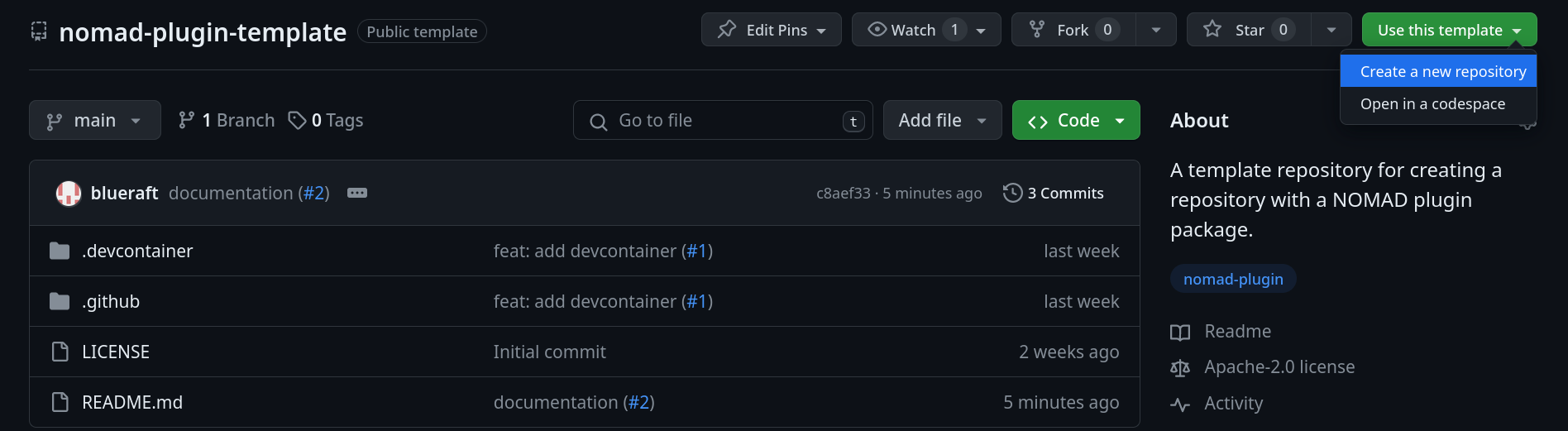
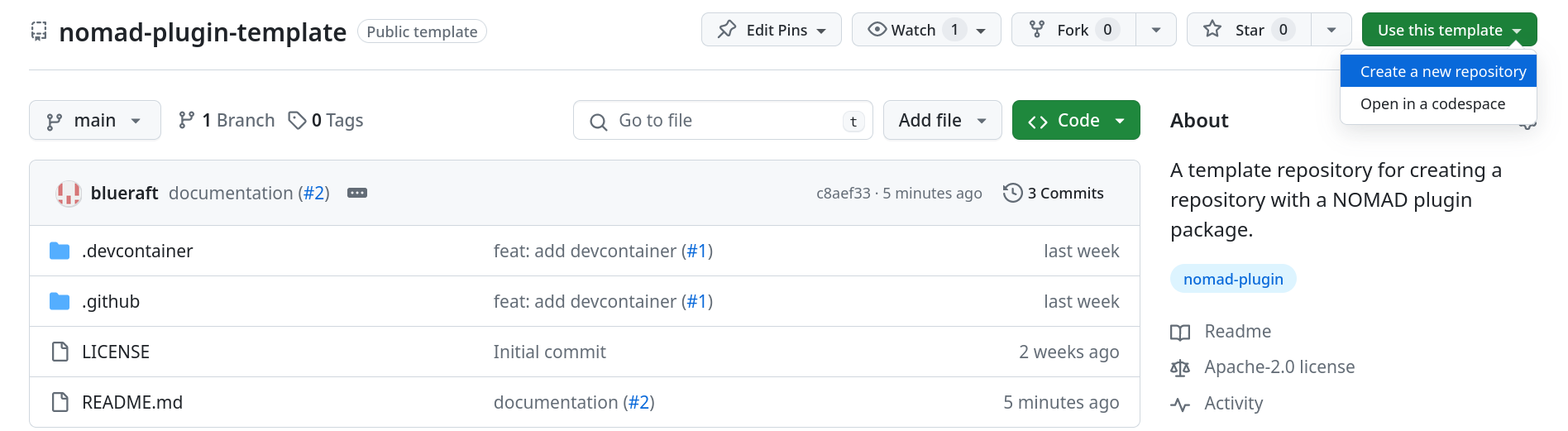
Enter a repository name (for example, nomad-optical-microscopy) and select Create repository to complete the setup.
Generate the plugin structure
Next, you will generate the initial structure of the plugin by applying the official NOMAD cookiecutter template.
Choose a development environment
In this step, you can proceed in one of the two following ways:
- Use GitHub Codespaces (cloud-based development), or
- Develop locally.
Option 1: Using GitHub Codespaces (Recommended)
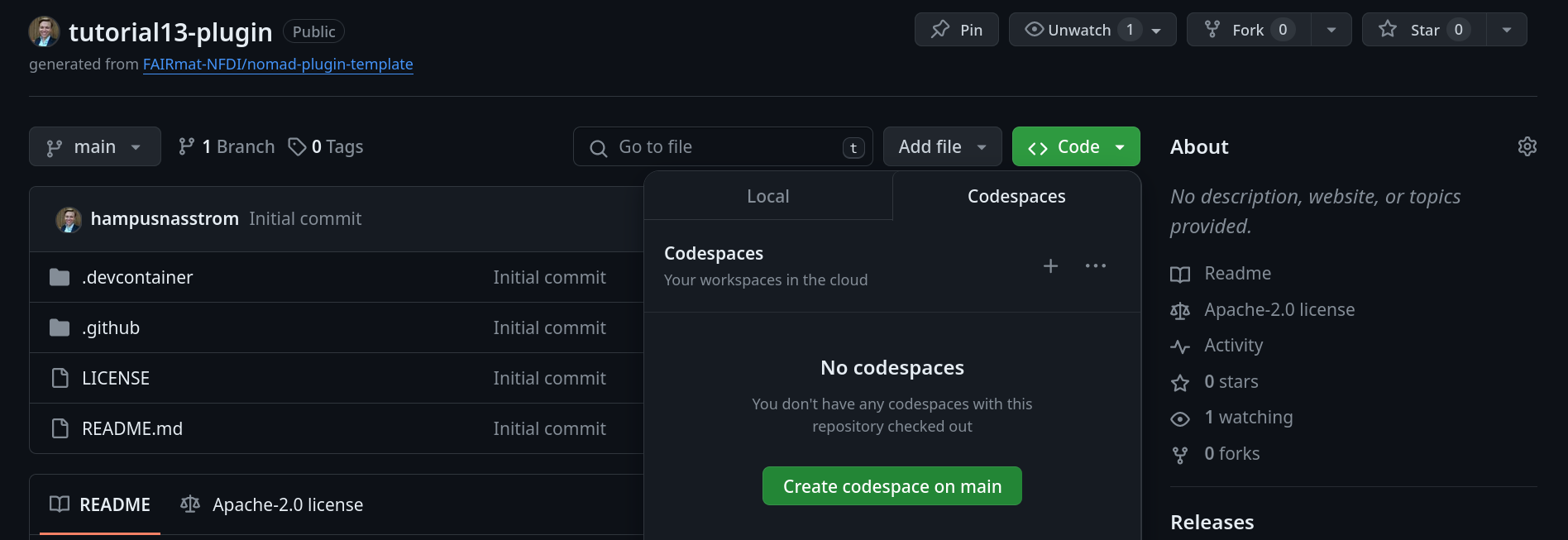
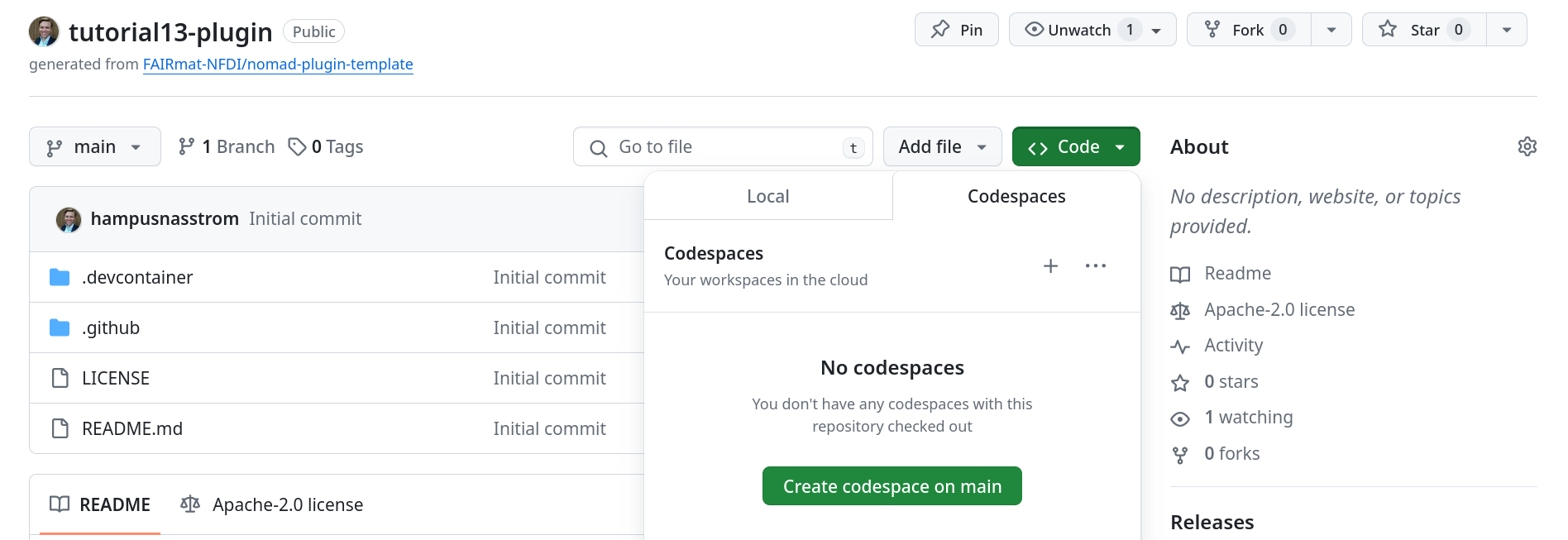
To use a GitHub Codespace for plugin development, click on the <> Code button in the repository and choose Create codespace on main.
Option 2: Developing locally
If you prefer to work locally, click on the <> Code button in the repository and choose the “Local” tab, copy the repository URL, and clone it to a selected location in your machine by running in terminal:
Use cruft to generate the plugin
Cruft is a tool that creates projects from Cookiecutter templates and keeps them up to date as the template evolves.
Install cruft
Skip this step if you are using GitHub Codespaces (cruft is available by default).
Install cruft, preferably using
pipx by running the following:
# pipx is strongly recommended.
pipx install cruft

# If pipx is not an option,
# you can install cruft in your Python user directory.
python -m pip install --user cruft
Run cruft
Generate the plugin structure by running in terminal:
Cookiecutter prompts you for information regarding your plugin. Enter values appropriate for your plugin. For example:
  [1/12] full_name (John Doe): Hampus Näsström
  [2/12] email (john.doe@physik.hu-berlin.de): hampus.naesstroem@physik.hu-berlin.de
  [3/12] github_username (foo): hampusnasstrom
  [4/12] plugin_name (foobar): optical-microscopy
  [5/12] module_name (optical_microscopy):
  [6/12] short_description (NOMAD example template): A schema package and parser plugin for optical microscopy.
  [7/12] version (0.1.0):
  [8/12] Select license
    1 - MIT
    2 - BSD-3
    3 - GNU GPL v3.0+
    4 - Apache Software License 2.0
    Choose from [1/2/3/4] (1):
  [9/12] include_schema_package [y/n] (y): y
  [10/12] include_normalizer [y/n] (y): n
  [11/12] include_parser [y/n] (y): y
  [12/12] include_app [y/n] (y): n
Selecting y for include_schema_package creates a Python package for the schema, and similarly for the parser.
You have just created a minimal NOMAD plugin with a plugin entry point for a schema package
optical-microscopy/
├── LICENSE
├── MANIFEST.in
├── README.md
├── docs
│   └── ...
├── mkdocs.yml
├── move_template_files.sh
├── pyproject.toml
├── src
│   └── optical_microscopy
│       ├── __init__.py
│       ├── parsers
│       │   ├── __init__.py
│       │   └── parser.py
│       └── schema_packages
│           ├── __init__.py
│           └── schema_package.py
└── tests
    ├── conftest.py
    ├── data
    │   └── test.archive.yaml
    ├── parsers
    │   └── test_parser.py
    └── schema_packages
        └── test_schema.py
The plugin is generated in a subdirectory. Move the files to the repository root using the provided helper script:
Finally, add the files to Git and commit the changes you have made:
Enable cruft updates
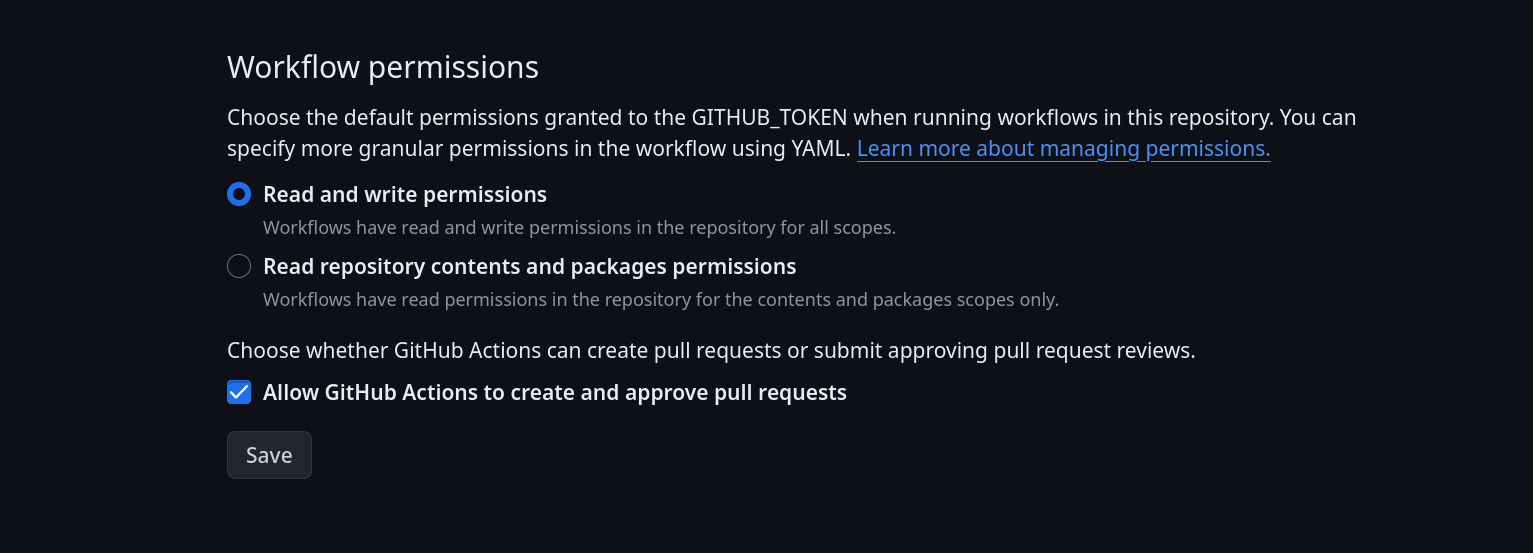
The template repository includes a GitHub Actions workflow that checks for updates to the cookiecutter template. The workflow runs automatically once a week and can also be triggered manually. To enable this functionality, grant the workflow permission to write to the repository and create pull requests.
From your plugin repository on GitHub, open the Settings page, and navigate to Actions → General (on the left pane):
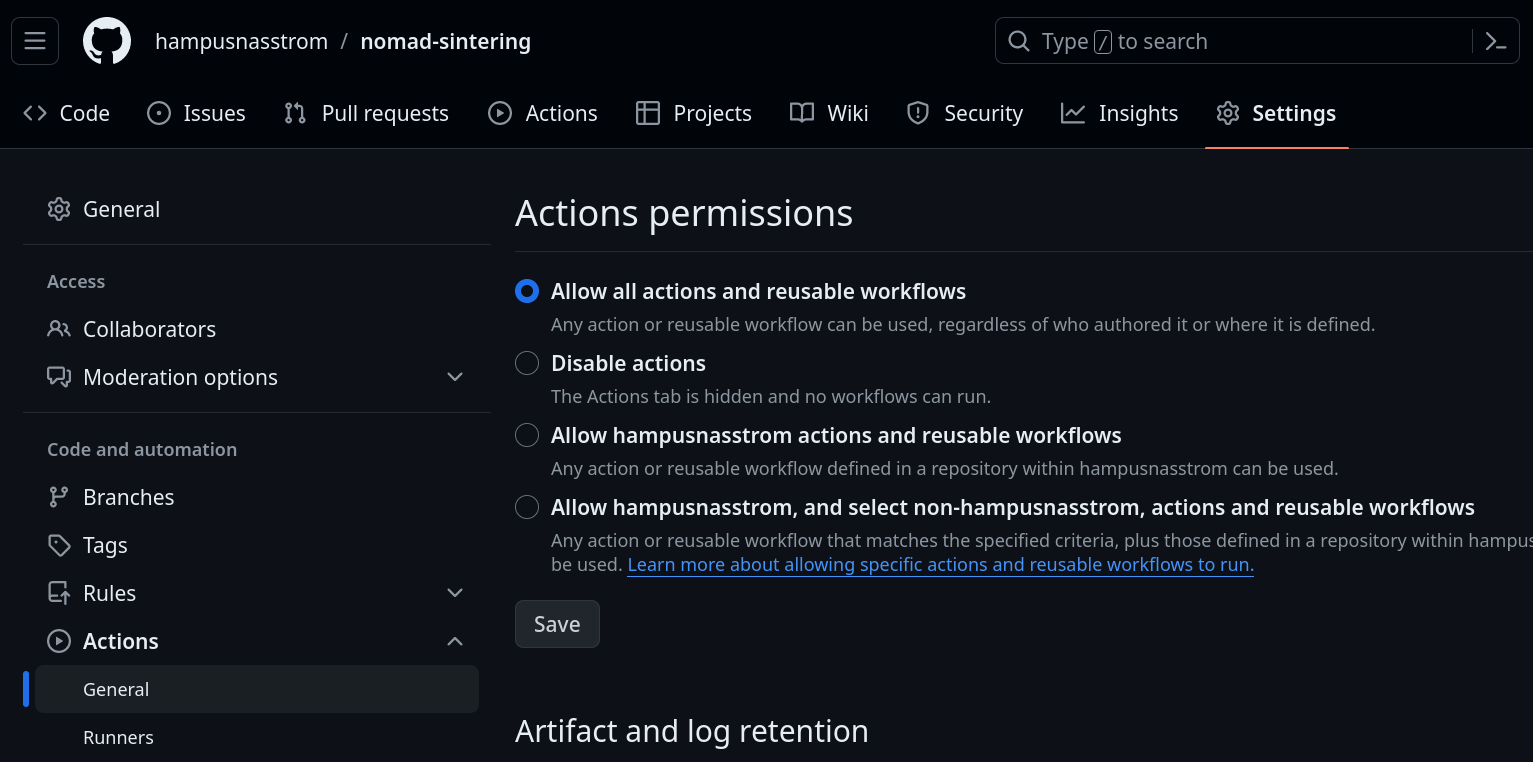
Scroll to the bottom of the page, select the "Read and write permissions" and check the "Allow GitHub Actions to create and approve pull requests" options, and then click Save.
Developing the plugin
The structure of the plugin is now ready for development for your specific purposes. If you plan to work with a single plugin and can avoid using NOMAD GUI functionality, stand-alone installation of the plugin will be sufficient. If you plan to work with multiple plugins or GUI-specific functionality, or if you wish to develop the core NOMAD package, we recommend using a dedicated nomad-distro-dev development environment.
Option 1: Stand-alone installation of the plugin
In this step, you will set up a Python environment and install the plugin for local development. This can be done conveniently in one step using uv or in several steps with pip.
(Recommended) Installation with uv
Open the terminal, navigate to the folder with your plugin using cd. Set up the plugin:
This sets up a dynamic Python environment. To run a command within the python environment, use:
(Alternative) Installation with pip
Open the terminal, navigate to the folder with your plugin using cd. Create a virtual environment using Python 3.12 and activate it:
Install the plugin package in editable mode using the NOMAD package registry:
You can stop using the virtual environment by running:
And return to it by running again in the terminal in the project folder:
Option 2: nomad-distro-dev
This option is designed to be used with a local Linux-based machine. The nomad-distro-dev also works with macOS or Windows, but some NOMAD plugins might not function correctly there.
This setup is required when you need to verify plugin behavior in the NOMAD GUI.
Start with forking nomad-distro-dev repository (Fork -> Create a new fork in the upper right part of the page). You will also need the following additional software installed on your system:
-
Docker - generally, only
docker-composefunctionality will be needed -
uv python package manager, version 0.5.14 or above
-
node.js version 20 or above and yarn version 1.22 or above are necessary to run the GUI
Then, follow the instructions in the nomad-distro-dev readme file under the Basic infra and Developing nomad + plugins locally headings.
Next steps
In the next tutorials you will learn how to add data schemas and file parsers to an existing NOMAD plugin.